By using hand tracking I created an air guitar that recognized hand gestures through a webcam that turned into playable guitar chords. My left hand selects the chord to be played while the other hand would play the chord when open, and be muted when closed. In addition it has both right/left handed modes, capos that increase the pitch, and on-screen displays of the chord and its current playing status. This is the most advanced Python project I’ve made that combines two of my passions: programming and music.
Getting Started
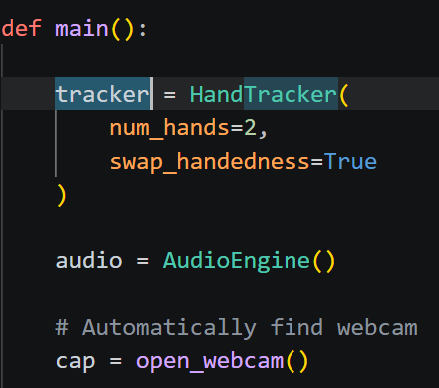
I used MediaPipe hand tracking to track the different gestures my left hand would make to select a chord and if my right hand was either opened or closed. MediaPipe has landmarks for different parts of the hand like the fingertips and finger joints which I used to determine whether individual fingers were raised or folded. My project uses OpenCV to read frames from the webcam and MediaPipe to process those frames.
One problem I ran into early was that the webcam was mirrored which made the hand labels confusing because the hand displayed on the left side of the image was not always labeled the way I expected. I adjusted the handedness labels so the program could correctly determine which hand was being used.
Giving Each Hand a Different Job
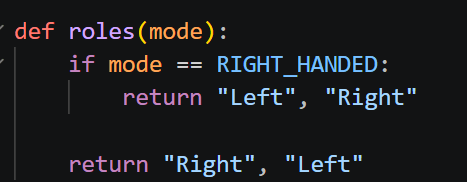
Now that both hands could be detected, I needed the application to know what each hand was supposed to do. Since my plan of left hand for chords and right hand for strumming is normal for right-handed guitarists, I decided to make a left-handed mode that reversed the roles.
Turning Hand Landmarks Into Finger States
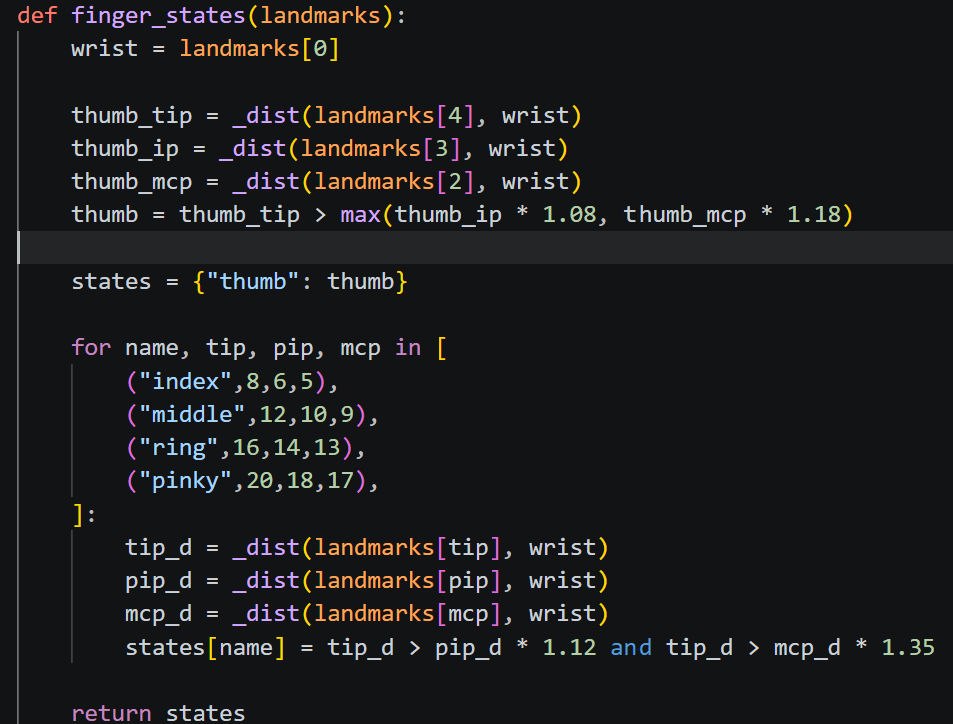
Since I did not want the chord detector to work directly with dozens of coordinate values, I reduced the hand into 5 values: Thumb, Index, Middle, Ring, Pinky. Later, I made it so if a finger was folded it would be registered as 0 and if raised would be registered as 1. This is how I made each chord have unique hand gestures by adjusting which place the fingers would be registered as either 0 or 1 for each chord.
Designing the Chord Gestures
My original plan was to have the application recognize actual guitar chord hand shapes; the problem was that real guitar chord shapes are hard to track since fingers are very close together. Since there is no physical guitar neck to provide context, my finger positions looked very similar from a webcam.
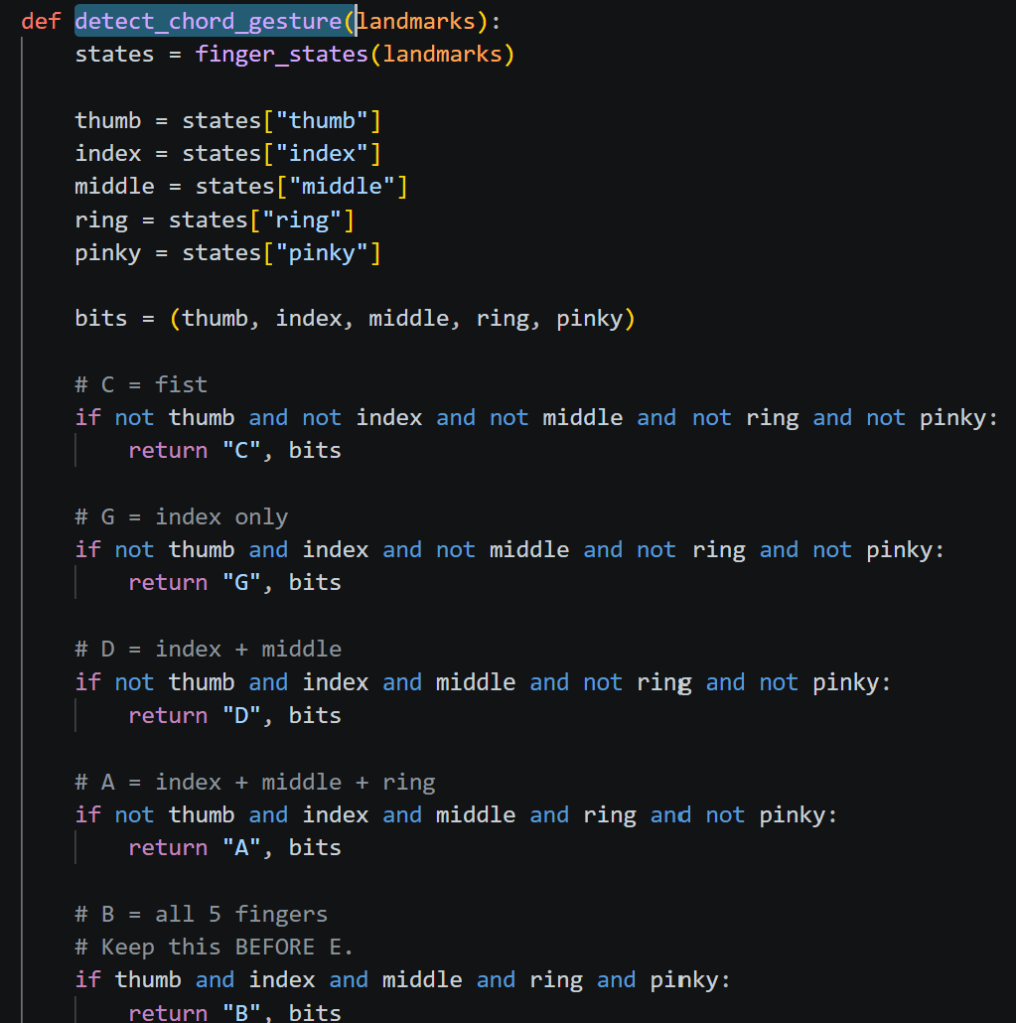
Instead of trying to recognize realistic fretboard positions, I changed the project to use clear symbolic gestures.
For example: Fist = C, Index = G, Index + Middle = D, Index + Middle + Ring = A, Thumb only = F, All five fingers = B
This was much more reliable than trying to imitate actual guitar fingering and also taught me that simplifying the user interaction is better than staying strictly with my idea.
Making Gesture Recognition More Stable
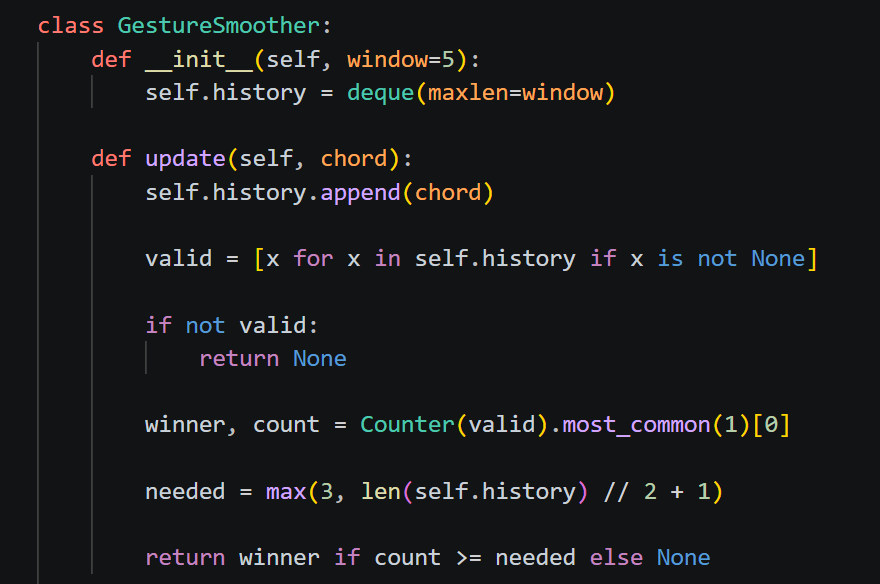
One issue that I ran into was that the webcam would not always recognize the same gesture consistently from frame to frame. To fix this, I added gesture smoothing; instead of the webcam trusting one frame, the application keeps a short history of recently detected chords. After enough frames agree which chord is being shown, then that chord becomes the selected chord.
Turning My Other Hand Into a Strumming Hand
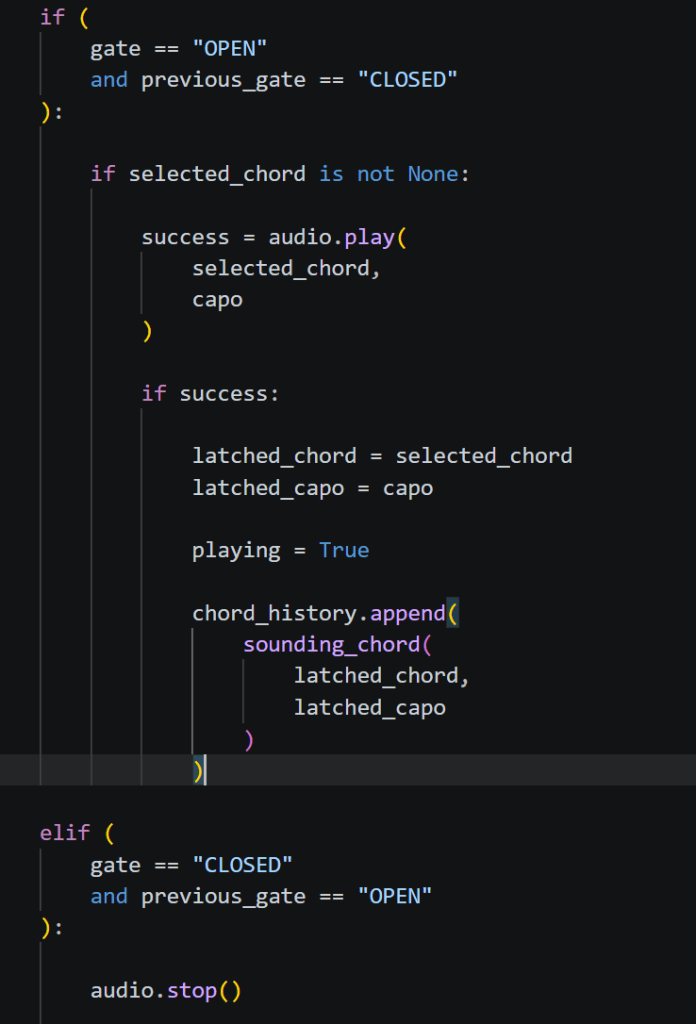
If I made the chord play every time the webcam recognized the gesture, it would constantly restart the sound every frame. To fix this, I made my strumming hand have two states: closed means muted and open means playing. The chord only plays when my hand changes from closed to open which mimics a guitar’s strumming motion.
Making the Strumming Hand More Reliable
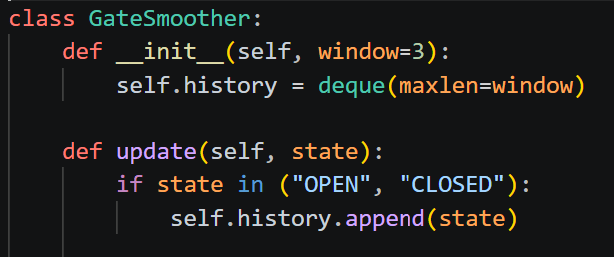
One issue I ran into was that the webcam would sometimes briefly recognize my open hand as closed, which would randomly stop the sound. To fix this, I added another smoothing system that checks a short history of whether my hand was open or closed before changing the state. At first, I made the smoothing too strong which caused a noticeable delay when I tried to strum. I lowered the amount of frames needed so it would still be stable while reacting fast enough to feel natural.
Representing Real Guitar Chords in Code
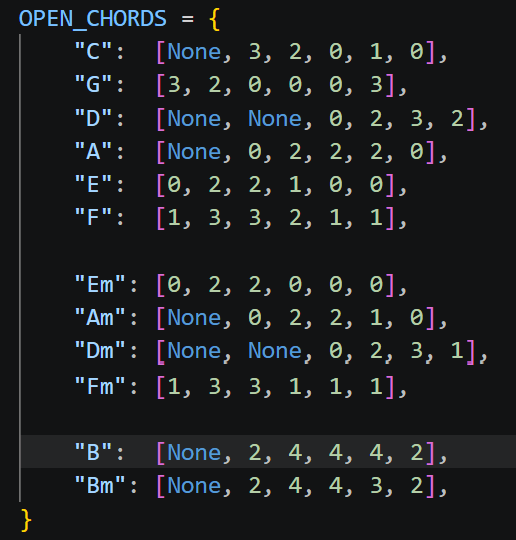
Once the gestures were working, I needed each chord to actually sound like a real guitar chord. I represented each chord with six values, one for each guitar string, where the numbers represent the fret being played and None means that string is muted. This let me use actual guitar chord shapes for chords like C, G, D, A, E, F, Em, Am, Dm, Fm, B, and Bm instead of just playing random notes.
Adding the Capo
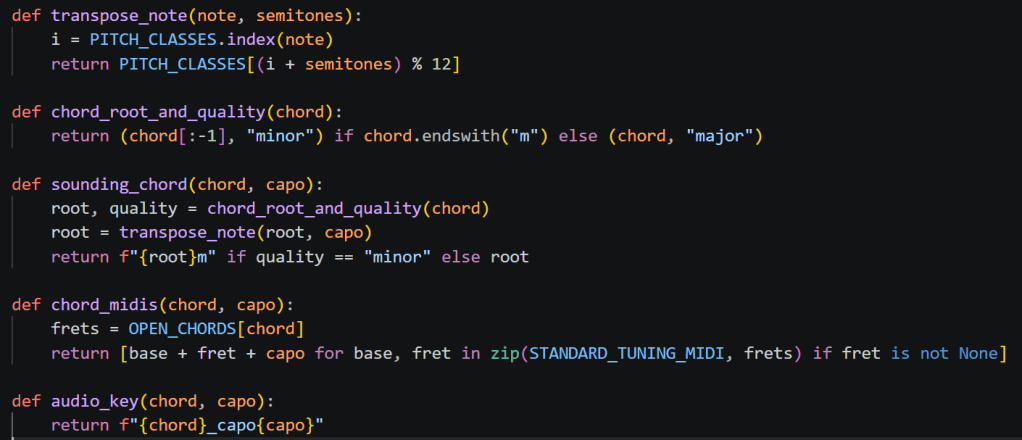
I also wanted to add a capo because it is something I use when I actually play guitar. I made the capo go from 0 to 7 and made sure it changed the actual pitch of the chord instead of only changing what was shown on the screen. For example, a C gesture with capo 0 plays C, while the same gesture with capo 2 plays D. I used MIDI note values and pitch classes to shift each note depending on the capo position.
Generating the Guitar Audio
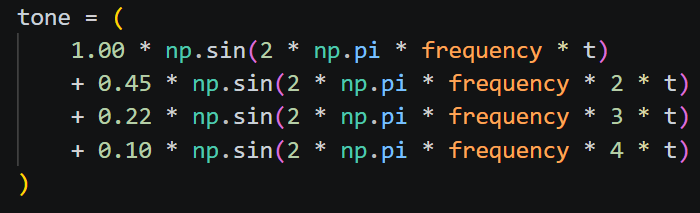
Instead of using recordings of guitar chords, I wanted the project to generate its own sounds. I used NumPy to create each guitar string using multiple frequencies and harmonics so it would sound less like a basic sine wave. I also added a small delay between each string so they would not all start at the exact same time, which made the sound feel more like an actual strum. Since I had 12 chords and 8 capo positions, the program generated 96 different WAV files.
The Audio Problem I Did Not Expect
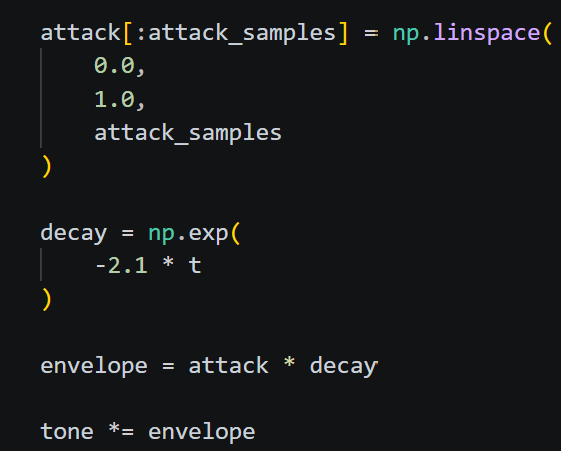
One of the biggest problems I ran into happened after I added B and B minor. The application recognized both gestures correctly, but neither chord made any sound. I realized that adding the chords to the gesture detector did not automatically create the audio files for them, so I regenerated all of the WAV files. After that, B and Bm worked, but then all of the other chords started sounding choppy at the beginning. At first, I thought adding B and Bm somehow broke the older chords. The actual problem was that regenerating the sounds replaced all of the previous WAV files, and the new audio was starting too suddenly. To fix this, I added a short attack that slowly raises the volume at the beginning of each sound and an exponential decay that made it fade more naturally. After regenerating the sounds again, the choppiness disappeared. This was one of the biggest debugging lessons from the project because the problem looked like it was caused by the new chords, but it was actually coming from the audio generation.
Loading the Sounds More Efficiently
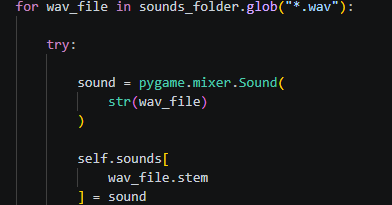
Another thing I changed was how the application loaded the sound files. At first, the program could load the WAV file every time I strummed a chord. Instead, I changed it so all of the sounds are loaded into memory when the application starts. When I strum, the program just finds the correct sound from a dictionary, which makes the audio system simpler and more efficient.
Building the Interface
I wanted the application to show what was happening while I was playing instead of only showing the webcam. I added the detected chord, gesture, capo position, current sounding chord, whether my strumming hand was open or closed, and whether the sound was playing or muted. I also kept the finger values on the screen because they helped me debug the gestures. If a chord was not being recognized correctly, I could look at which fingers were being read as 0 or 1 and immediately see what was wrong. I also added the gesture map on the side so the user could easily see which hand gesture controls each chord.
What I Learned From Building the Air Guitar
This project taught me a lot because it combined different areas of programming that I had not really used together before. I worked with Python, OpenCV, MediaPipe, NumPy, Pygame, hand tracking, audio generation, MIDI notes, and music theory. The biggest thing I learned was how different real-time programs are compared to programs that just take one input and give one output. The webcam is constantly producing new frames, and the hand positions can slightly change every frame. Because of that, I had to think about timing, smoothing, state changes, and how to stop the program from reacting to every small detection mistake. I also got better at debugging because many problems were not caused by the part of the project I first expected. The B and Bm problem was a good example because what looked like a gesture issue ended up being an audio problem.
Final Result
By the end of the project, I created a gesture-controlled Air Guitar that recognizes 12 major and minor chord gestures, generates guitar-style audio, switches between right-handed and left-handed modes, and supports capo positions from 0 to 7. One hand selects the chord while the other hand controls when the chord is played or muted. What started as a simple idea of controlling guitar chords with hand gestures turned into a project that combined computer vision, audio generation, music theory, and real-time programming. The part I enjoyed most was seeing all of the different parts work together. MediaPipe tracks the hands, my gesture logic turns the hand positions into chords, the guitar theory code decides which notes should be played, NumPy generates the sounds, Pygame plays them, and OpenCV displays everything on the screen. This project also taught me again that getting stuck is part of programming. A lot of the problems looked confusing at first, but breaking them into smaller parts made them much easier to solve.

