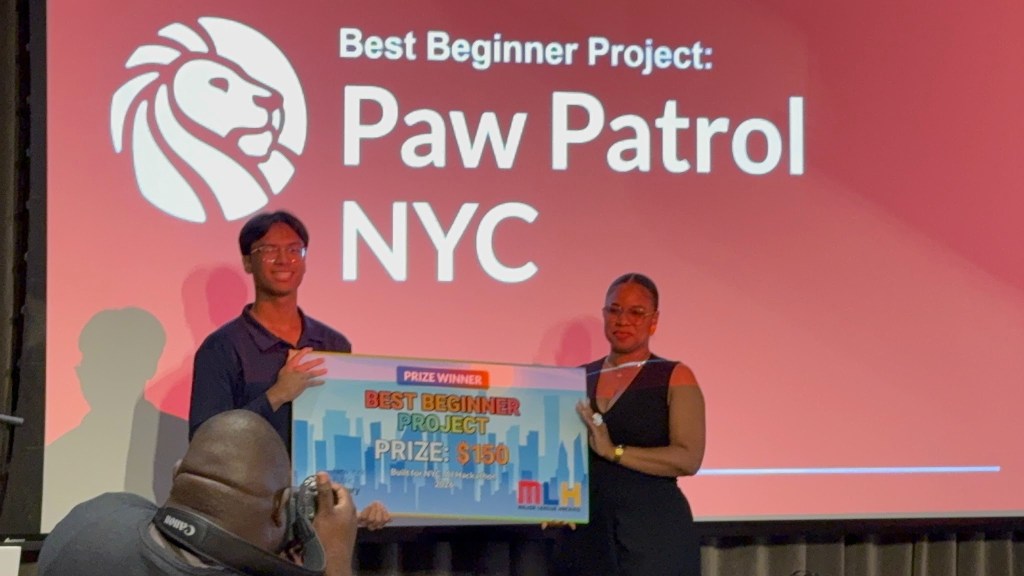
Participating in my first hackathon was exciting, but it was also much more challenging than I expected. The goal of the NYPL Built for NYC AI Hackathon was to create something that solved a real problem in New York City, which meant I had to come up with an idea, build it, debug it, and eventually explain it to judges within two minutes.
For my project, I built Paw Patrol NYC, a full-stack web application designed to connect dog owners who live near each other. By the end of the hackathon I had also won Best Beginner Project.
What made this project different from the React website I had built before was that I was no longer only working with a frontend. Paw Patrol NYC required React, a backend server, a database, external APIs, and mapping tools to all work together.
Getting Started
The idea for Paw Patrol NYC came from a friend who had lost his dog and spent a lot of time trying to find him. I started thinking about how different that situation could be if dog owners in the same neighborhood already knew each other.
Instead of building an application that only becomes useful after a dog goes missing, I wanted to build a community first. Dog owners could meet through walks and playdates, recognize each other’s dogs, and build relationships with people living nearby.
Then, if a dog ever did go missing, the owner would already have a local group of people who knew what the dog looked like and could help look for it.
Figuring Out What the App Should Do
Once I had the idea, the next problem was deciding what I could realistically build.
I had a lot of features in mind, including messaging, pet sitting, AI dog matching, community events, maps, and missing dog alerts. Trying to build all of them at once would have made the project too large for a hackathon.
I decided that the main flow should be:
- A user creates a profile for themselves and their dog.
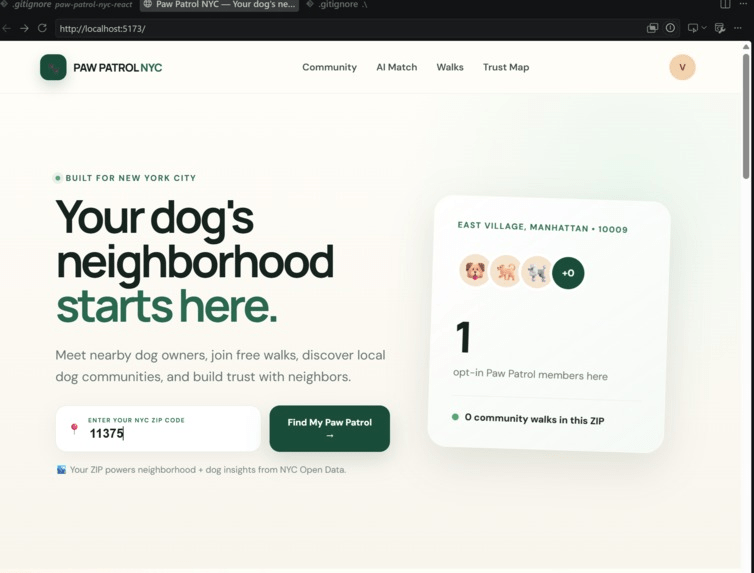
- The user enters their NYC ZIP code.
- The application finds information about dogs in that area.
- Nearby Paw Patrol members are displayed.
- Users can create or join community walks.
- Users can see other dog owners around their neighborhood.
Keeping this basic flow helped me decide which features were important enough to finish first.
Using NYC Open Data
Since the project was supposed to solve a problem in New York City, I wanted NYC Open Data to actually affect what appeared in the application.
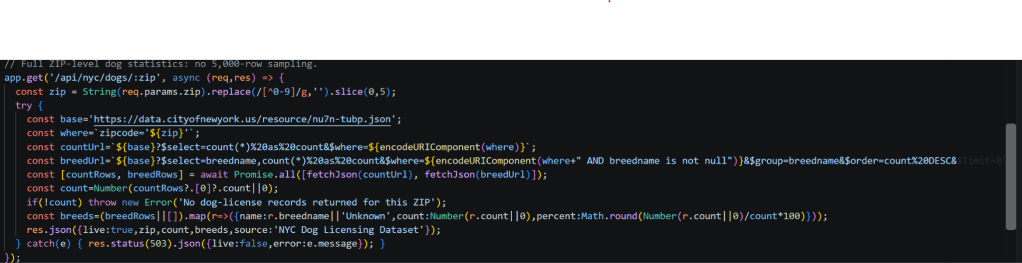
I connected the backend to the NYC Dog Licensing Dataset. When a user entered a ZIP code, the application could request dog licensing records for that area.
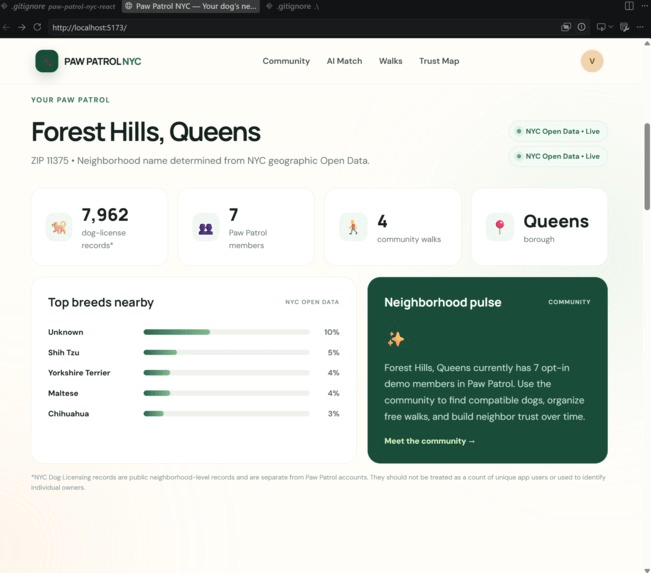
This meant the website could display information such as the most common breeds nearby instead of showing completely hardcoded statistics.
One issue I ran into was how I calculated the breed percentages. At first, I was requesting a limited number of records and calculating the percentages from that sample.
I realized that this could make the results inaccurate.
I changed the backend so that the API request grouped the records by breed and counted the full results for the selected ZIP code.
That taught me that using an API is not only about successfully receiving data. I also had to understand what I was asking the API for and whether the result actually represented what I wanted to show.
Turning ZIP Codes Into Neighborhoods
Another problem I ran into was displaying the correct neighborhood name.
At first, the easiest solution would have been to write something like:
11375 = Forest Hills
That would work for one ZIP code, but it would stop being useful as soon as someone entered a ZIP code I had not manually added.
I wanted the same feature to work across New York City.
To solve this, I used NYC Open Data for ZIP Code Tabulation Areas and Neighborhood Tabulation Areas.
The backend takes the ZIP code entered by the user, finds its geographic area, and then determines which NYC neighborhood that location belongs to.
This was one of the first times I worked with geographic data. I learned that ZIP codes and neighborhoods do not have perfectly matching boundaries, so location data can be more complicated than simply matching one value to another.
Instead of maintaining my own list of neighborhoods, the application could now determine the location from NYC data.
Building the Community Database
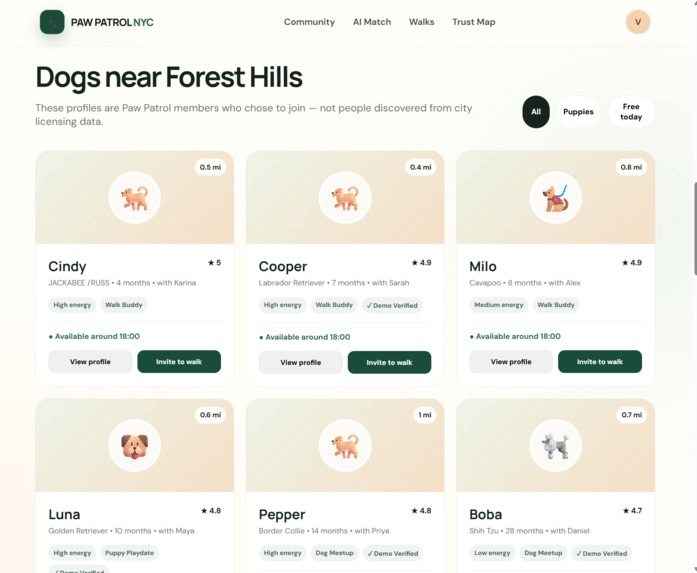
NYC Open Data could tell me about dogs in a neighborhood, but it could not tell me which people wanted to join Paw Patrol NYC.
I needed a separate place to store the users who voluntarily joined the community.
For this, I used SQLite with an Express backend.
Each member could have information such as:
{
owner: “Sarah”,
dog: “Cooper”,
breed: “Labrador Retriever”,
zip: “11375”,
availability: “18:00”,
lookingFor: “Walk Buddy”
}
Before using the database, it would have been easy to create several fake member cards directly inside React.
The problem with that approach was that nothing could really change. Every user would permanently exist inside the frontend code.
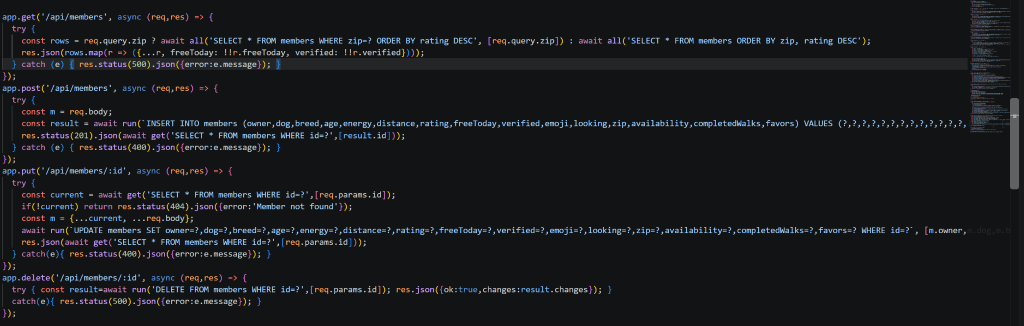
With SQLite, I could create backend routes that allowed the application to read, add, edit, and delete community members.
This was one of the biggest differences between Paw Patrol NYC and the smaller React projects I had built before. The information appearing on the screen was now coming from a database instead of only being written directly inside a component.
Building the First-Time Signup
At first, I had an Add Member button inside the community section.
Technically, it worked, but it did not make much sense from a user’s point of view.
“Add Member” sounded more like something an administrator would click instead of the first step for someone trying to join the platform.
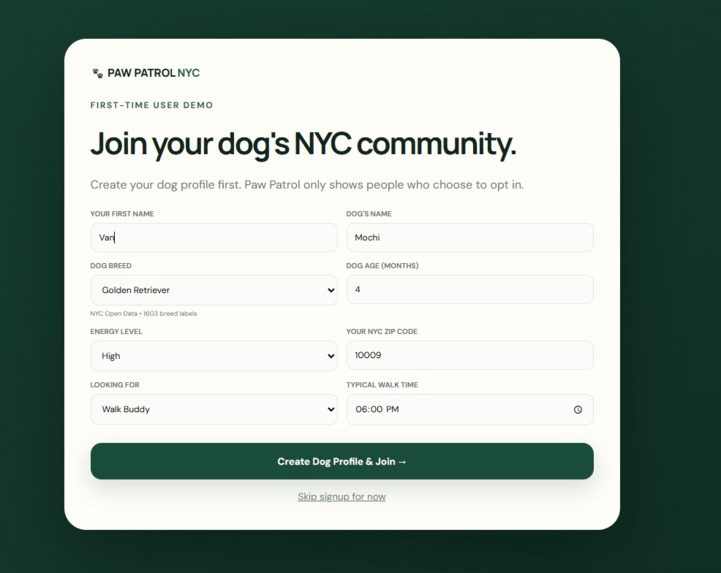
I changed the flow so that when someone opens Paw Patrol NYC for the first time, they can create a profile for themselves and their dog.
The signup asks for information such as:
- owner’s name
- dog’s name
- breed
- age
- energy level
- ZIP code
- what the owner is looking for
Once the profile is created, that information can be sent to the backend and stored with the other Paw Patrol members.
This change taught me that getting a feature to work is not always enough. I also had to think about how a normal user would understand the feature.
Building Community Walks
The community needed a reason for dog owners to actually meet each other.
That led to the Community Walks feature.
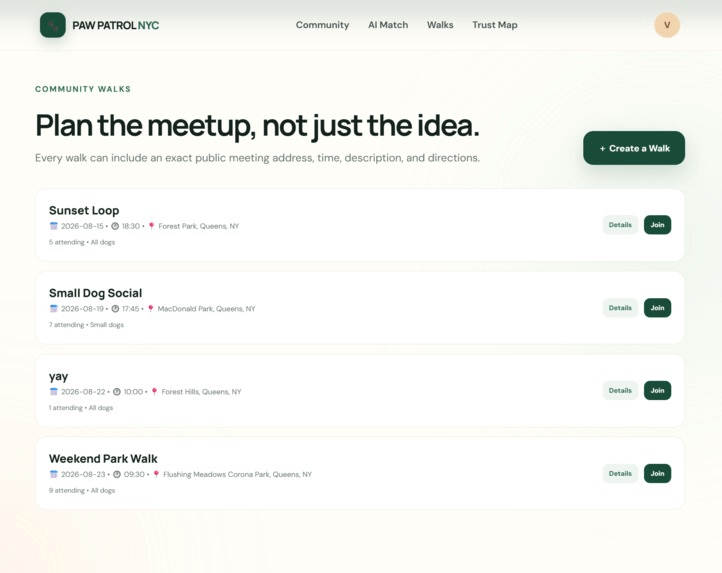
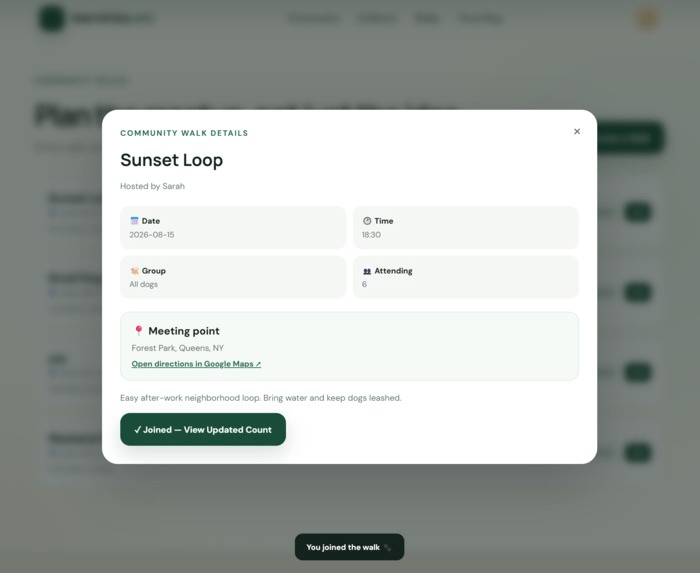
Users could create a walk with:
- a name
- date
- time
- description
- meeting address
The walk would then appear for other members in that ZIP code.
Other users could view the details and join the event.
I also used the meeting address to create a Google Maps directions link. Instead of only telling someone where the walk was happening, they could click the link and immediately open directions.
This feature helped connect the technical side of the project with the original idea. If dog owners regularly meet through walks, they are more likely to recognize each other and each other’s dogs.
Building the Trusted Neighbors Map
The next feature I wanted was a way to visualize the dog community around the user.
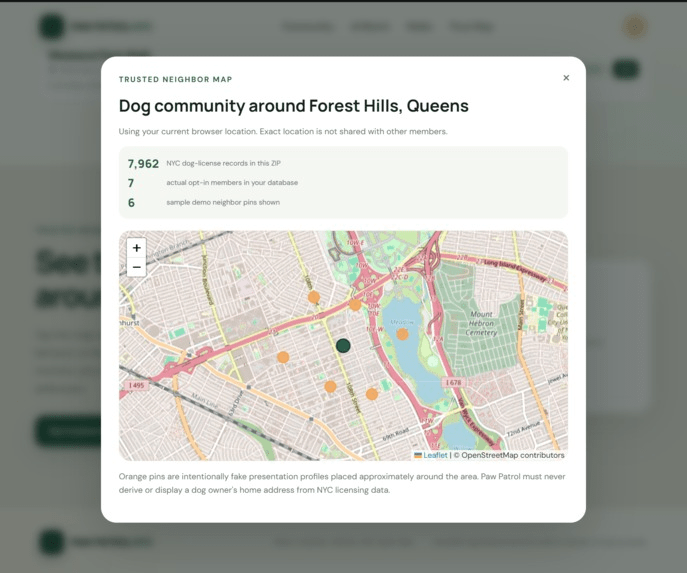
I used Leaflet with OpenStreetMap to create an interactive map.
The map could center itself using either the user’s current browser location or the location associated with their ZIP code.
For the hackathon demo, I placed sample Paw Patrol members around that location.
This feature also made me think more about privacy.
The NYC Dog Licensing Dataset provides neighborhood-level information, but I did not want the application to make it look like NYC Open Data was revealing where individual dog owners lived.
Because of that, the map uses separate sample community profiles instead of trying to identify anyone from licensing data.
That taught me that when working with public datasets, I also have to think about how the user might interpret the data being displayed.
Making the App Reliable for a Hackathon
Another thing I was not expecting was how much I had to think about the live presentation while building the application.
At one point, NYC Open Data was temporarily unavailable.
My code could be completely correct, but the website could still stop working because an external service was down.
That was a problem because I did not want the entire presentation to depend on whether another website happened to be working at that exact moment.
For parts of the application that used sample community information, I added demo data so the main experience could still be shown during the presentation.
This made me realize that building a project for a live demo is different from only running something on my own computer. I had to think about what would happen if something outside of my code failed.

The Part That Taught Me the Most: Debugging
Just like with my first React website, debugging ended up being one of the most valuable parts of the project.
The difference was that Paw Patrol NYC had many more places where something could go wrong.
Some of the problems involved:
- React state
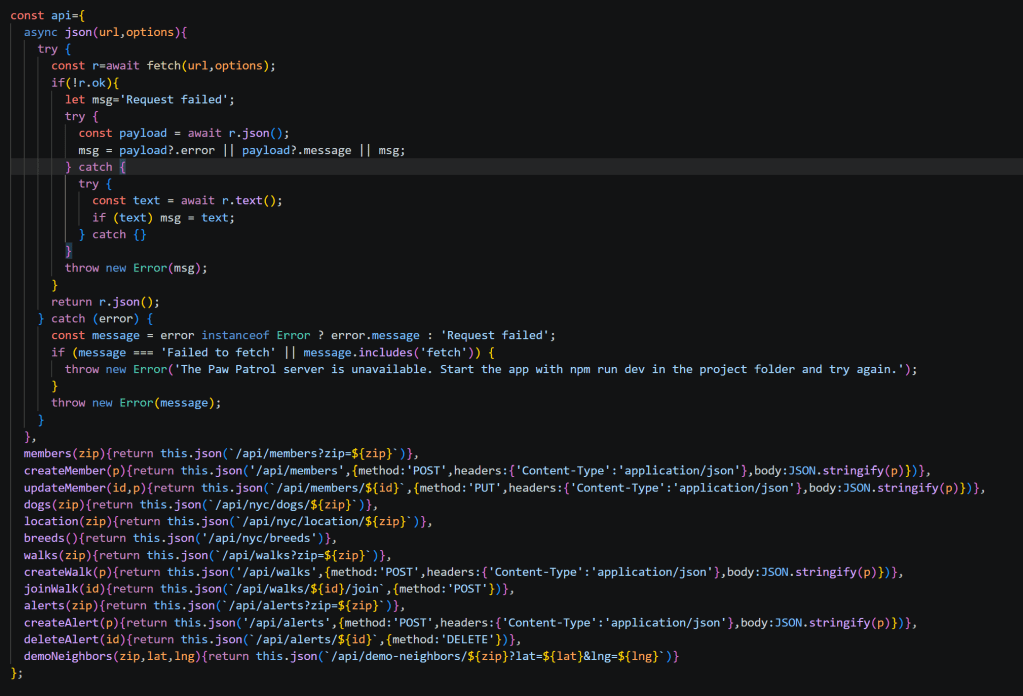
- API requests
- ZIP code data
- NYC Open Data responses
- SQLite records
- Express routes
- frontend and backend communication
- geographic data
One thing I started getting better at was figuring out which part of the application was actually causing the problem.
If something did not appear correctly on the screen, I could not immediately assume React was the issue.
I started asking questions such as:
Is the frontend making the request?
Is the Express route receiving it?
Is SQLite returning the right information?
Is NYC Open Data returning the format I expected?
Is React displaying the response correctly?
This made debugging much more manageable.
Instead of treating the entire application as one large problem, I could test each part separately.
Presenting the Project
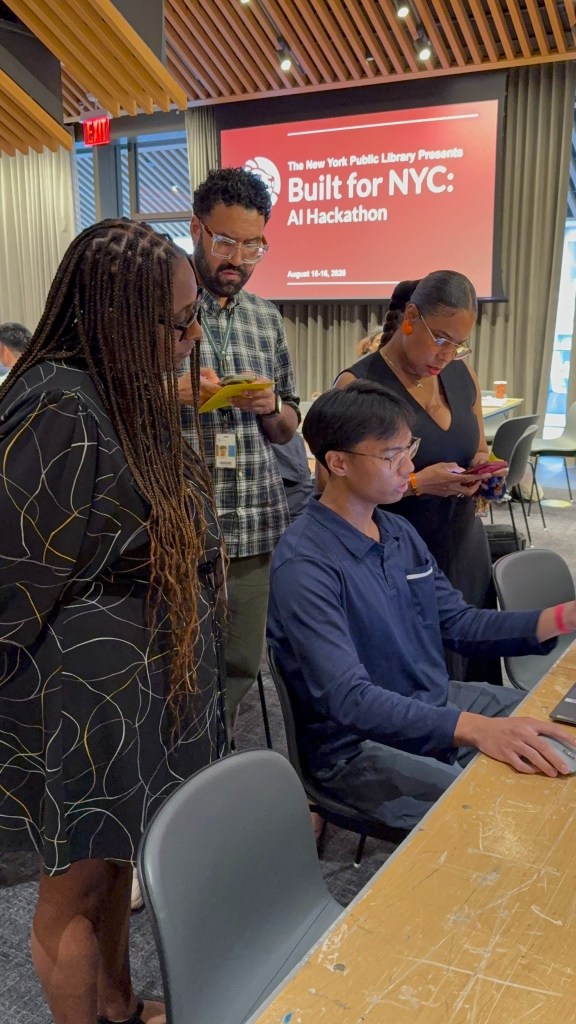
Another new experience was having to present my project to judges.
Building a feature and explaining a feature are two different skills.
I had several technical parts I could have talked about, but I realized that the judges first needed to understand why Paw Patrol NYC existed.
The main idea I explained was that there are many dog owners living close together in New York City who may never actually meet each other.
Paw Patrol NYC gives those owners a way to build a local community through dog profiles, neighborhood information, and community walks.
Over time, those connections could also become useful when something goes wrong, such as a dog becoming lost.
During the demo, I showed how someone could enter their ZIP code, view information about their neighborhood, find other dog owners, and interact with the community features.
Explaining the project taught me that a technical demo should not only show what the code can do. It also needs to make it clear what problem the code is trying to solve.
What I Learned From My First Hackathon
By the end of the hackathon, I had worked with much more than I originally expected.
I learned more about:
- React
- Node.js
- Express
- SQLite
- REST APIs
- NYC Open Data
- geographic datasets
- Leaflet
- OpenStreetMap
- connecting a frontend to a backend
- working with a database
- debugging under a time limit
- presenting a technical project
More importantly, I learned that building a hackathon project is not about creating every possible feature.
I originally had many ideas for Paw Patrol NYC that I did not have enough time to finish.
Instead, I had to decide which features best demonstrated the main idea and make those parts work well enough to present.
That was different from working on a project with no deadline because I had to constantly decide what was actually important.
Final Result
By the end of the hackathon, I had built a full-stack version of Paw Patrol NYC with a React frontend, Express backend, SQLite database, NYC Open Data integration, dog profiles, neighborhood lookup, community walks, and an interactive trusted-neighbor map.
I also ended up winning Best Beginner Project.
Since this was my first hackathon, I went into it mainly wanting to understand what a hackathon was like and see whether I could finish a project under the time limit.
At the beginning, the idea was still changing and there were a lot of parts I did not know how to build yet. By the end, I understood much better how the frontend, backend, database, APIs, and map could all connect into one application.
My biggest takeaway was similar to what I learned while building my first React website: getting stuck is part of programming.
The difference this time was that I had more moving pieces and less time to solve the problems.
Finishing Paw Patrol NYC gave me more confidence in taking an idea that starts as a problem I notice and turning it into something I can actually build and present.

